PlotLabeller Context Manager
The purpose of PlotLabeller is to assist with setting tick label locators and formatters consistently for
multiple plots. This helps to ensure that your plots maintain a common formatting look and, in conjunction with the
TexEngFormatter class, that axes tick labels do not have excessive digits for large or small numbers.
In its simplest form, PlotLabeller will simply apply the TexEngFormatter tick label formatter
to all the axes of any plots created within the context manager. If the minor tick formatter is set to NullFormatter,
this is respected and the minor tick labels are left unset.
You can pass optional parameters x, y and z to the PlotLabeller which contain either:
A subclass of
matplotlib.ticker.Formatterormatplotlib.ticker.LocatorAn instance of either
matplotlib.ticker.Formatterormatplotlib.ticker.LocatorA list or tuple of either of the above. This allows both a locator and a formatter to be specified for the corresponding axes within one
PlotLabellercontext manager.
To use PlotLabeller, you would typically just stack it with SavedFigure:
with (SavedFigure(figures / "fig01c.png", style=["stoner"], autoclose=__name__ != "__main__"),
      PlotLabeller()):
    fig, ax = plt.subplots()
    for p in [10, 15, 20, 30, 50, 100]:
        ax.plot(x * 1E5, model(x, p) * 1E-6, label=p, marker="")
    ax.legend(title="Order")
    ax.autoscale(tight=True)
    ax.set(**pparam)
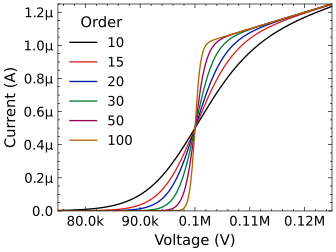
This will give a plot somewhat like: